October 2026 Dev Updates - Helper Script and Torn Planner
Public — anyoneLast updated 1 month ago by Fogest
October 2026: Helper Script Update and the Torn Planner#
Two things are new for Nuke Family members this month. The Nuke Family Helper script gained four features, and nuke.family has a new page called the Torn Planner.
| New | Where you find it |
|---|---|
| One-click connect | Any Torn page, with the script installed |
| OC Assistant | Your faction's Organized Crimes page |
| Chain watch | Your faction's main page, and nuke.family |
| Ranked war board | Any ranked war view |
| Torn Planner | nuke.family/planner |
Getting the script#
Install it from this address in Tampermonkey, Violentmonkey or TornPDA:
If you have the script already, open the same address and your userscript manager offers to reinstall it. In TornPDA, update it from the userscripts list in the app's settings. You keep your key and your settings.
The script works in a desktop browser and in TornPDA. If you've never used a userscript in Torn before, you may need to allow userscript permissions for the Tampermonkey extension before userscripts will actually run properly within any webpage.
Connecting the script#
You no longer copy a key from nuke.family and paste it into Torn.
A bar at the top of Torn tells you the script has no connection. Press Connect. nuke.family opens, you press Approve, and the script on Torn picks up its key within a few seconds.

No nuke.family account? You do not need one#
On the approve page, paste your Torn API key and press connect. nuke.family checks the key with Torn, makes you a script-only account, and connects the script. You give no email and no password.
Two things to know about a script-only account:
- nuke.family stores your Torn key, the same as it does for registered members. Features such as the ranked war board rely on members' keys. The script itself does not see or keep your Torn key.
- A script-only account cannot log in to nuke.family. To use the website (the planner, chain watch signup, your revive history), register with an email and password later. Registering upgrades the same account, so the script stays connected.
If you are connected already#
You do nothing. Your current key keeps working.
If the connection breaks#
The script used to fail without a word. Now the bar tells you which problem you have: no key, a key nuke.family turned down, or no answer from nuke.family. A short note also sits beside each feature that cannot load.
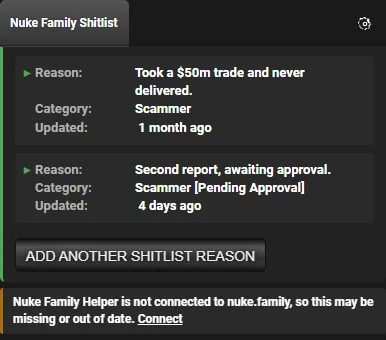
You can hide the bar for a day.
TornPDA#
TornPDA clears a page's storage from time to time, and the script lost its key each time. The script now keeps your key and settings in TornPDA's own script storage. It moves them across by itself the first time it runs.
Entering a key by hand#
The old way still works. Open your faction's Controls tab and press Change Nuke Family Key. If you paste a Torn API key by mistake, the script tells you so and keeps your old key.

OC Assistant#
Open your faction's Organized Crimes page. Each faction's leaders choose which of these parts their members see.
It picks your slot#
Each open role shows the minimum CPR your faction wants for it. On the Recruiting tab, a bar above the list names the best slot for you, and the script tags that slot in the list. It weighs your CPR in the role, the crime's level against yours, and whether the crime starts soon enough to keep your days productive.
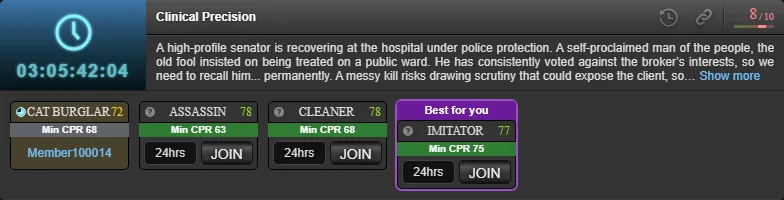
It warns you about a bad slot#
If you sit in a role you do not qualify for, in a crime with more than 24 hours left, the bar says so and lists better slots (only applies if productivity setting on for some warnings)

It asks staff for a crime#
With nothing decent open at your level, the bar offers an Ask staff for a level 7-8 crime button (or 5-6, and so on). Press it and Nuke Assistant posts your request in Discord for your faction's staff (only shows if faction has setting enabled).

Level 9 and 10 members: Torn does not let a faction spawn a level 9 or 10 crime directly, they come from finishing lower chains of elaborate crimes. The script treats a level 8 crime as a fit for you if no level 9 or 10 crime suits, and it asks for a 7-8 on your behalf if no level 8 is applicable.
For staff#
Staff see flags under filled slots on the Recruiting and Planning tabs: unqualified, not productive, under-levelled. Each flag has its own colour and symbol. Flag settings in the bar lets you switch flags off and set your own thresholds.
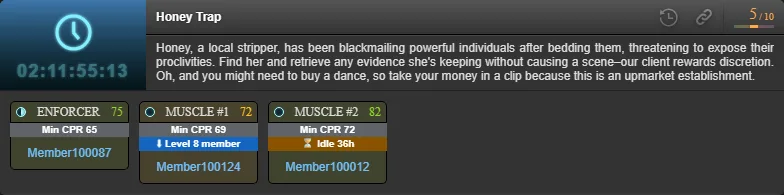
The script also sends your own CPRs to nuke.family as you browse the page, so your leaders can see who fits which role.
Chain watch#
Chain watch replaces the signup spreadsheet many factions used. It has three parts.
Signing up on nuke.family#
Your leaders set up a watch at nuke.family/chain-watch. You claim the hours you can cover from a list or a timeline. Each hour shows its xanax rate and how many paid spots remain. Sign up past the paid spots and you count as an extra.
You can ask for a reminder before your slot, by Discord DM or by browser notification.
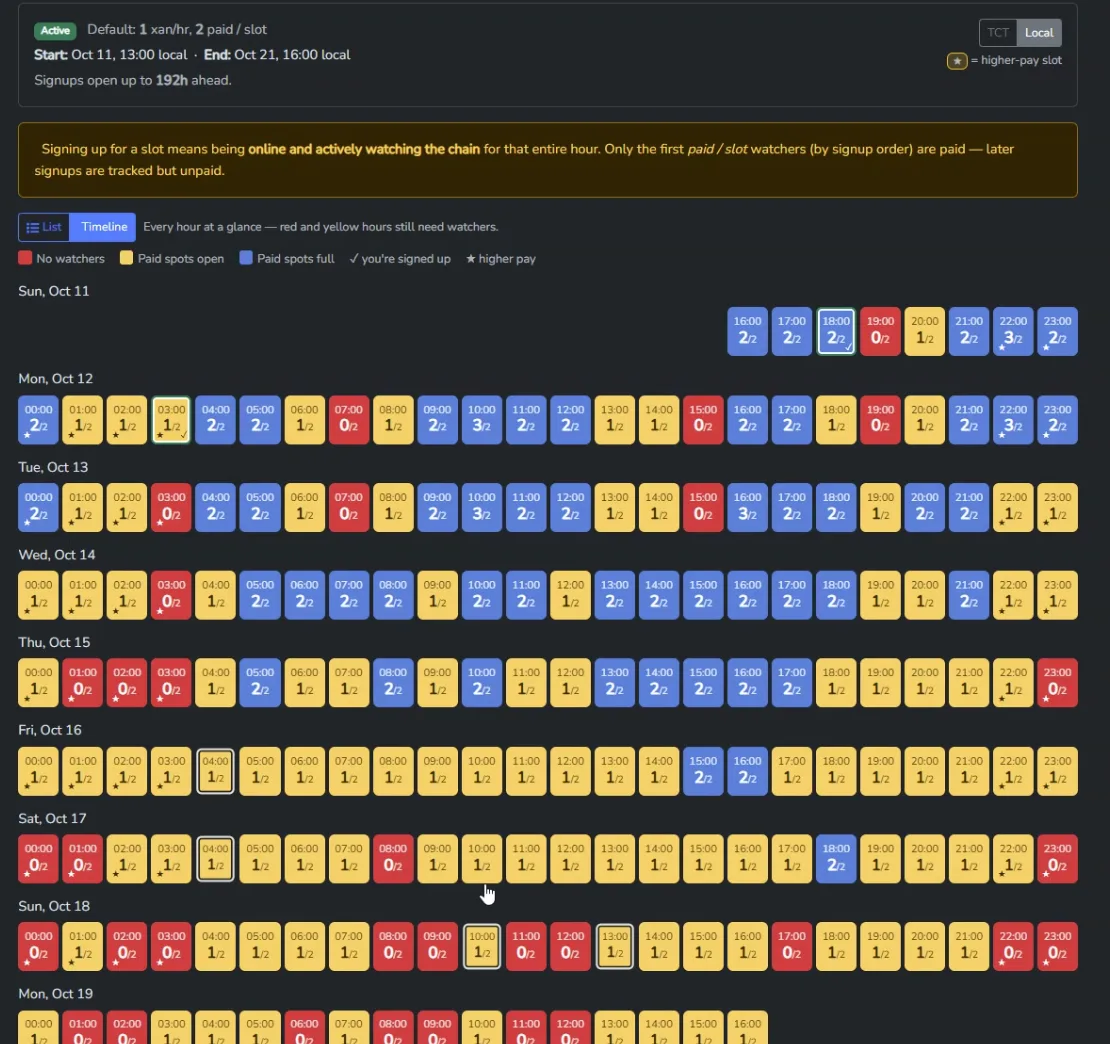
Leaders can also post the watch in Discord with /chain-signup post. The post has signup, check-in and check-out buttons, and shows who is on watch now.
The bar on your faction page#
With the script installed, a slim bar sits under the chain box on your faction's main page. It shows your next slot or tells you to check in. Expand it to see the roster, who has checked in, and the open slots. You sign up, check in and check out from Torn.

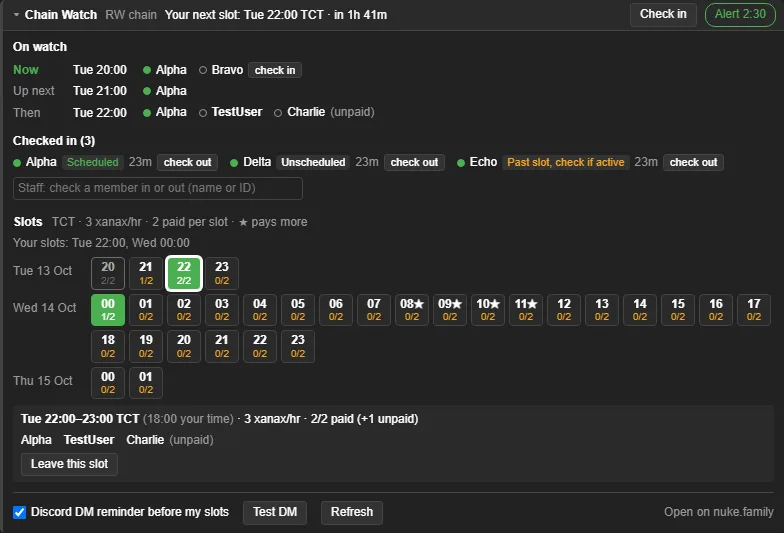
At the end of your slot, Nuke Assistant DMs you to ask if you are still watching. Answer there or in the bar. If you do not answer in 15 minutes, the site checks you out at the end of your slot.
Staff can check other members in and out from the same bar.
The chain timer alert#
The bar includes a chain timer alert. The page flashes, and beeps if you want, once the chain timer drops below a time you choose (2:30 by default). The alert ignores chains under 25 hits.
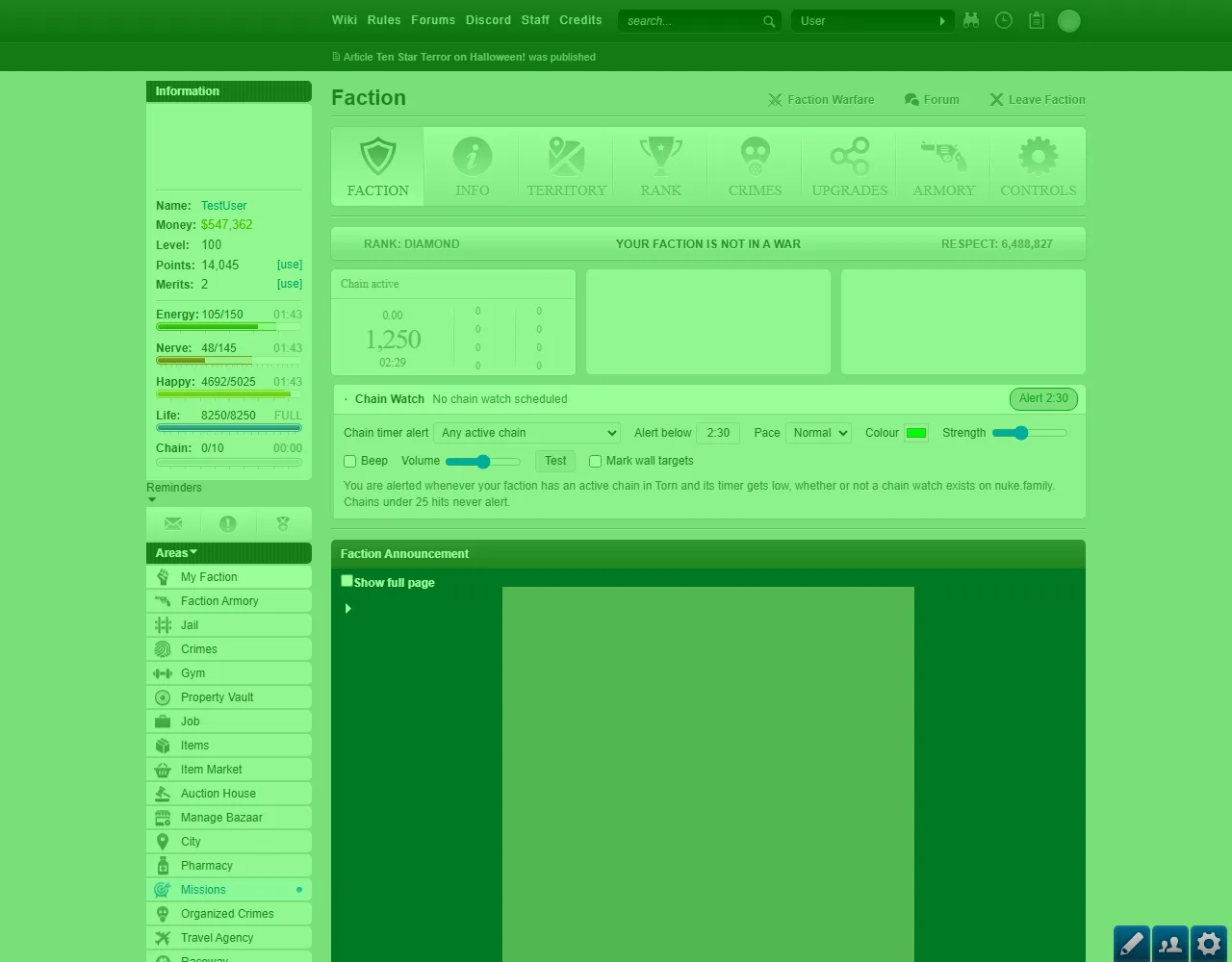
In the bar's settings you pick the flash colour, the pace, the volume, and which chains set it off: any chain, chains with a watch set up, or chains you checked in for.

If you use the old standalone "Chain watcher" script, remove it. The helper script copies your settings from it.
Ranked war board#
Open a ranked war, your own faction's or one on another faction's page.
- Hospital countdowns. Each member's status cell shows the time until they leave hospital, or where they are flying.
- Sorting. Keep each side sorted by status, so the next targets sit at the top, or by battle stat estimate.
- A second sort. Within the same status you choose the order: stats, war score, or latest out of hospital.
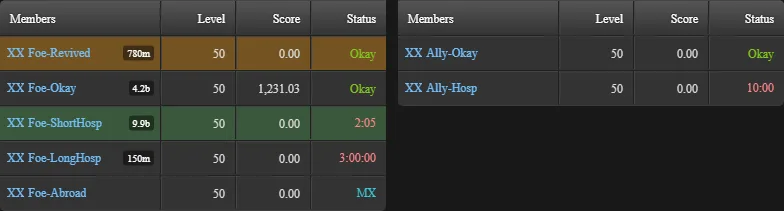

Stat estimates come from BSP or FF Scouter. If you run either, the script reads the figures off the page and shares them with nuke.family. If you run neither, the script shows you the estimates other members shared.
The script does not call Torn's API for this and does not ask for your Torn key. nuke.family reads the statuses from Torn once for all members watching.
Torn Planner#
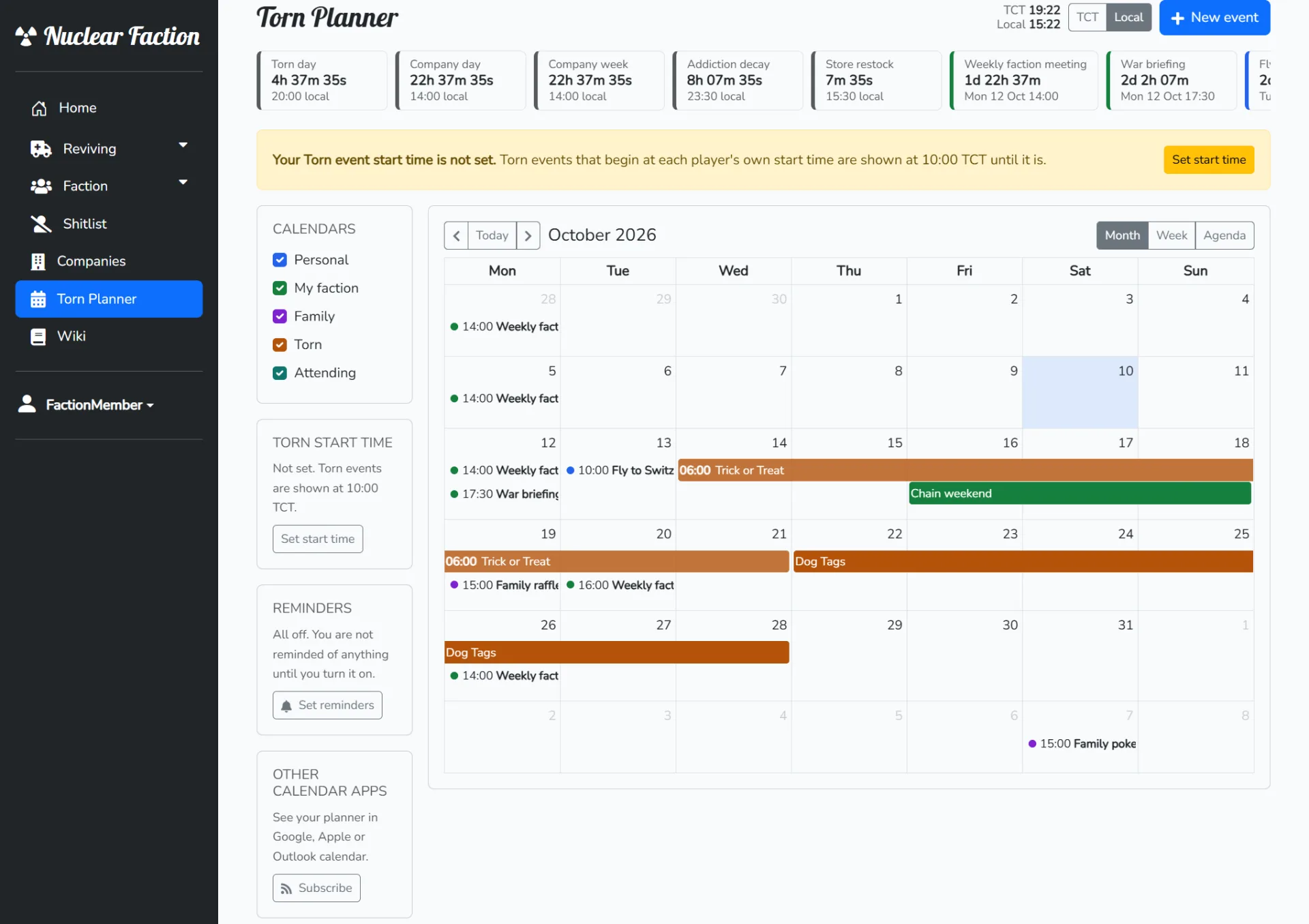
nuke.family/planner is a calendar for Torn. It replaces the old Torn Time Tracker and the embedded calendar. You need a nuke.family login to use it.
Four kinds of event#
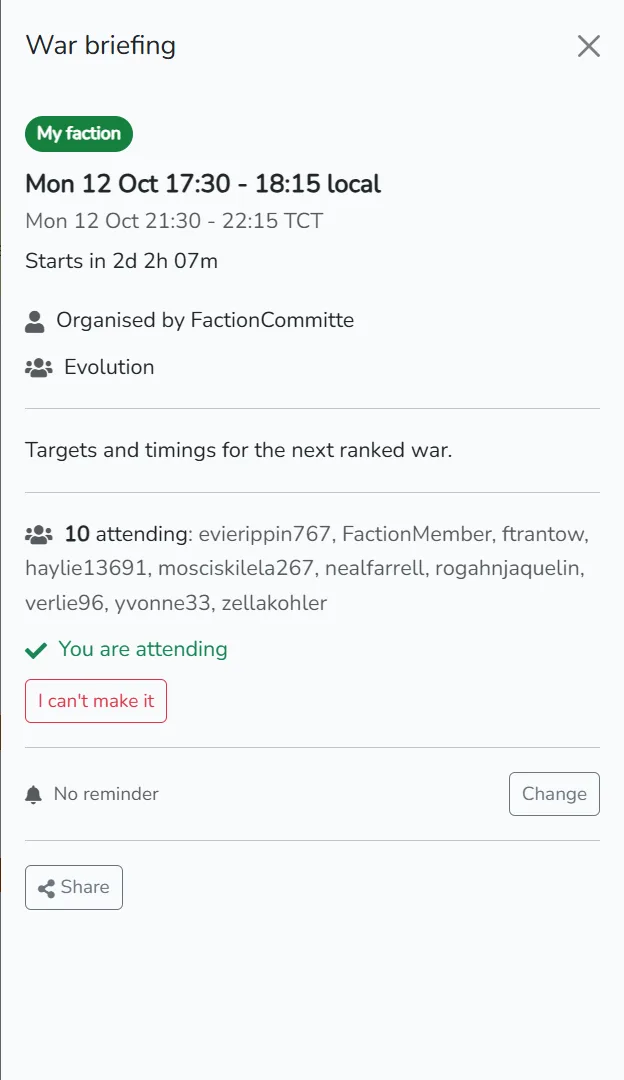
- Personal. Yours alone: a flight landing, a booster cooldown, a company train.
- Faction. Your faction's leaders add these for the faction.
- Family. Events for all of Nuke Family.
- Torn. Torn's own events and competitions, already filled in.
Events can repeat on any schedule. All times are in TCT.
Torn events at your own start time#
Torn starts some events at a different time for each player. The planner reads your start time from Torn and places those events for you. Torn needs a Minimal access key for that. If your key on nuke.family is a Public one, the planner asks you for a new key, or you can pick your start time by hand.
Attendance#
Mark yourself as attending a faction or family event. For a repeating event, you choose one date or the whole series.
Reminders#
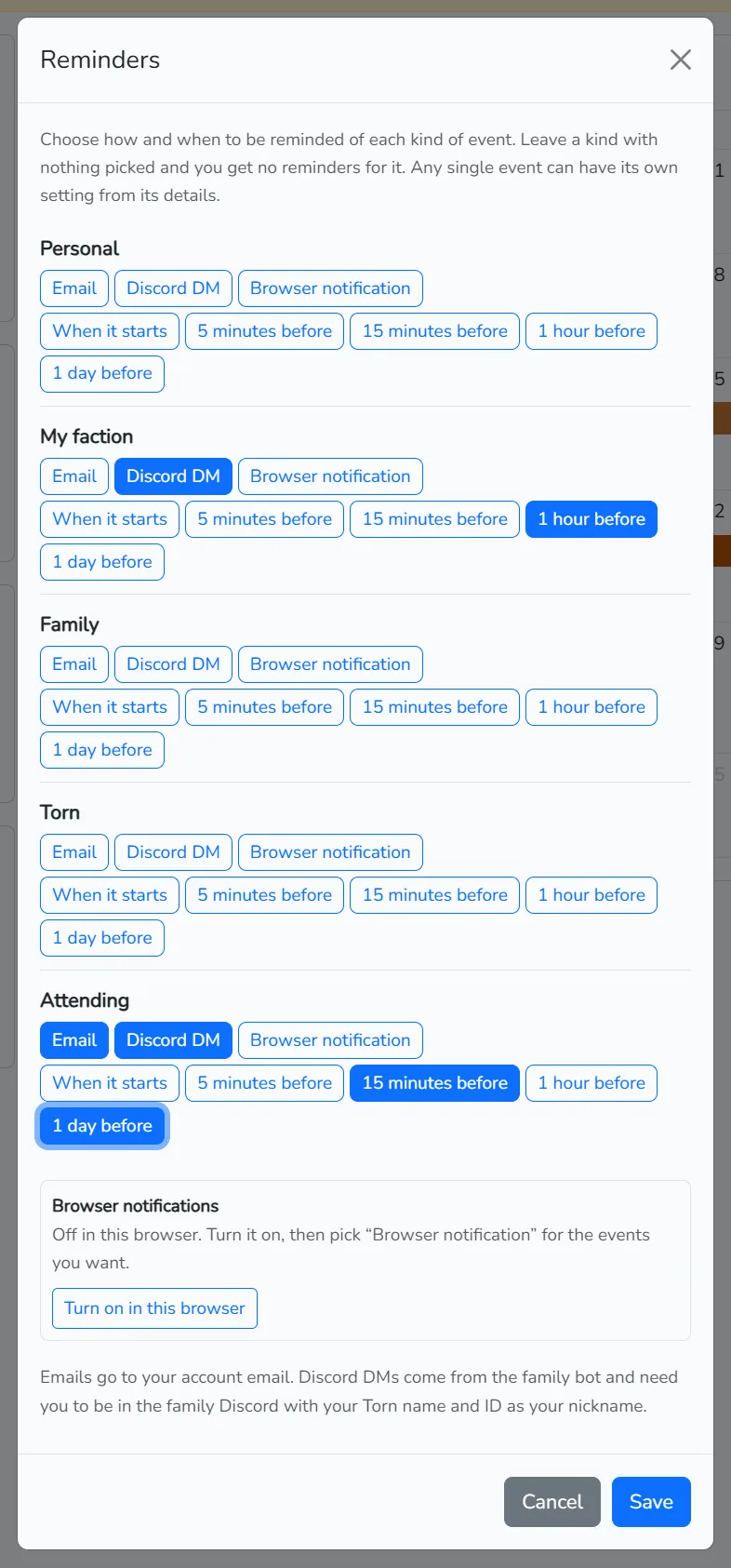
Reminders are off until you turn them on. Choose which kinds of event remind you, and how: a browser notification, an email, or a Discord DM from Nuke Assistant. A bell on each event overrides your defaults for that one event.
Your own calendar app#
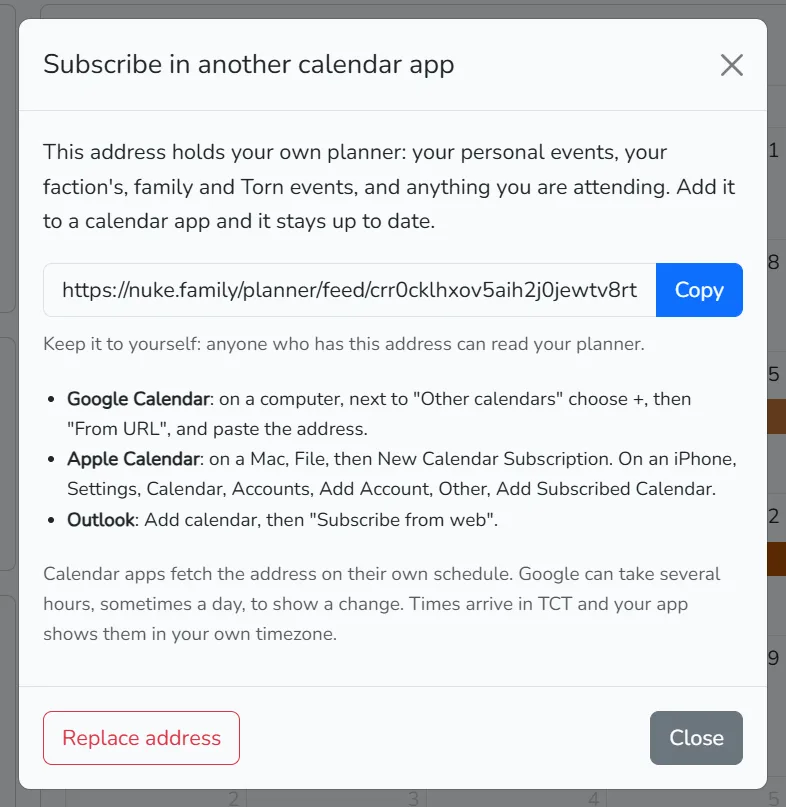
The planner gives you a private feed address. Add it to Google Calendar, Apple Calendar or Outlook and your Torn events appear beside the rest of your life.
For leaders#
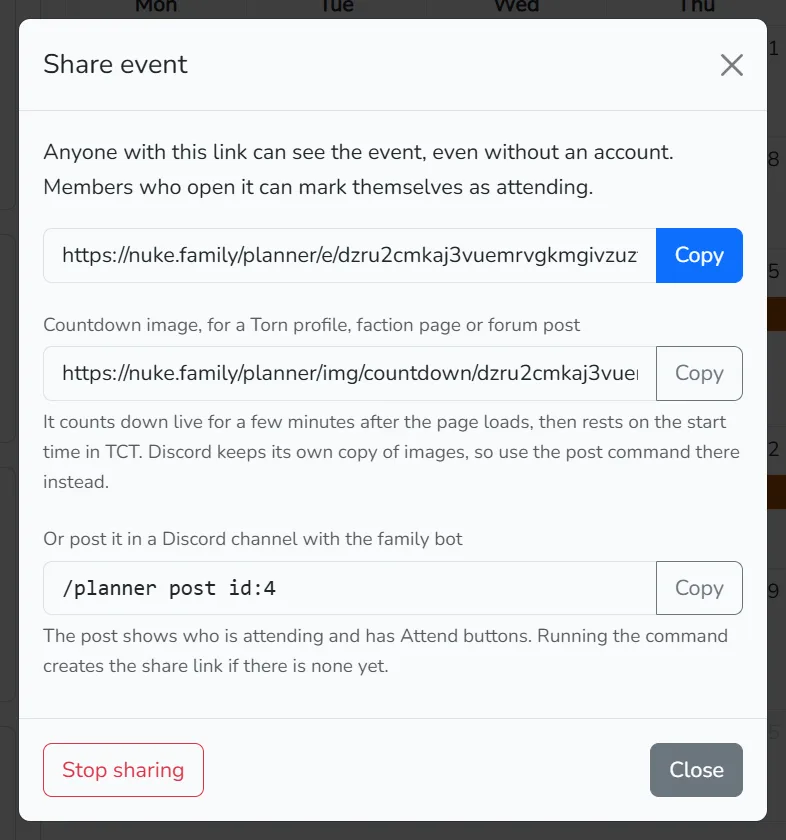
- Share an event. Sharing gives the event a public page with a countdown and a calendar file. People without a login see the event and a count of who is going.
- Post it in Discord.
/planner post id:<id>puts the event in a channel with attend buttons. The post updates as people sign up. - Countdown image. Each shared event has a countdown GIF you can embed.
- Faction events image. One fixed image address lists your faction's upcoming events, then Family and Torn ones. Put it on your faction's Torn page once and it stays current. You choose the background and the font colours.
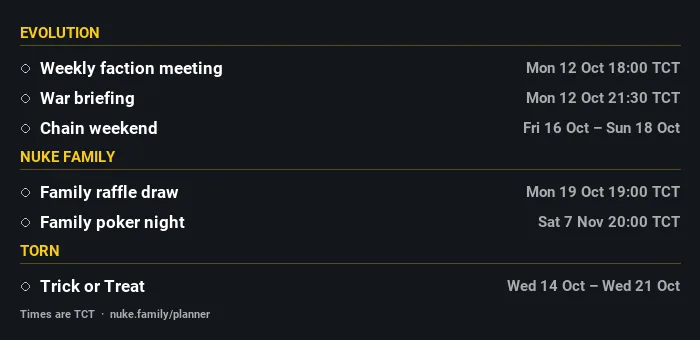
Leaders can edit their own faction's events. Board members can edit family events and can view each faction's calendar.
Something not working?#
Open your faction's Controls tab and press NFH Debug Info, then Send to developer. The script shows a six character reference. Post that reference in Discord with a line about what went wrong.
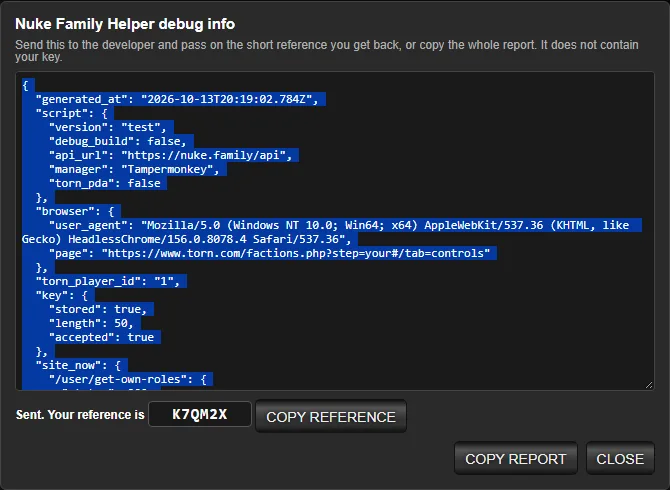
The report holds the script version and what nuke.family answered. It leaves out your key.
Faction Announcement Mail Template#
<p style="font-size: 20px; margin: 0 0 8px 0;"><strong>Helper script update + the new Torn Planner</strong></p>

<p>The Nuke Family Helper script has four new features, and nuke.family has a new calendar. The short version is below. The <a href="https://nuke.family/wiki/dev/october-2026-updates">full release notes</a> have the details and more pictures.</p>

<!-- LEADERS: replace the paragraph inside this box with your own note, or delete the whole box. -->
<div style="border-left: 4px solid #d4a017; padding: 8px 12px; margin: 12px 0;">
<p style="margin: 0 0 6px 0;"><strong>A note from your leaders</strong></p>
<p style="margin: 0;">[LEADERS: write your own note here. For example: which OC Assistant settings your faction has switched on, any changes to your CPR requirements, or the date of your next chain watch.]</p>
</div>

<hr />

<p style="font-size: 16px; margin: 14px 0 6px 0;"><strong>Get the script</strong></p>
<p>Install it in Tampermonkey, Violentmonkey or TornPDA from this link:<br />
<a href="https://github.com/Fog-Development/nuke-family-helper-script/raw/master/nuke-family-helper.user.js">nuke-family-helper.user.js</a></p>
<p>Have it already? Open the same link to update. You keep your key and your settings.</p>

<hr />

<p style="font-size: 16px; margin: 14px 0 6px 0;"><strong>One-click connect</strong></p>
<p>You no longer copy a key from nuke.family into Torn. Press <strong>Connect</strong> in the bar at the top of Torn, press <strong>Approve</strong> on nuke.family, and the script picks up its key within a few seconds.</p>
<p><img src="https://nuke.family/storage/wiki-images/2026/10/249340c0-135c-4896-b8ec-9141ca2f2f4c.webp" alt="The connect bar at the top of a Torn page" style="max-width: 100%; height: auto;" /></p>
<ul>
<li><strong>No nuke.family account?</strong> Paste your Torn API key on the approve page and the script works with no email and no password. Register later if you want to use the website.</li>
<li><strong>Connected already?</strong> You do nothing. Your key keeps working.</li>
<li><strong>TornPDA:</strong> the script used to forget its key at random. It now keeps your key through cache clears.</li>
<li><strong>If the connection breaks,</strong> the bar tells you so and says which problem you have.</li>
</ul>

<hr />

<p style="font-size: 16px; margin: 14px 0 6px 0;"><strong>OC Assistant</strong></p>
<p>Open the faction's <strong>Organized Crimes</strong> page.</p>
<ul>
<li>Each open role shows the minimum CPR our faction wants for it.</li>
<li>On the Recruiting tab, a bar names the best open slot for you and the script tags it in the list.</li>
<li>If you sit in a poor slot with more than a day left, the bar warns you and lists better ones.</li>
<li>With nothing decent open at your level, one button asks staff for a new crime.</li>
<li>Staff get flags on members in the wrong slot.</li>
</ul>
<p><img src="https://nuke.family/storage/wiki-images/2026/10/721f9383-2a3e-4f71-8e64-8d9810ac378a.webp" alt="The best slot named in the bar and tagged in the list" style="max-width: 100%; height: auto;" /></p>
<p>Each faction's leaders choose which of these parts their members see.</p>

<hr />

<p style="font-size: 16px; margin: 14px 0 6px 0;"><strong>Chain watch</strong></p>
<p>Chain watch signups now run on nuke.family, with no spreadsheet. Claim your hours at <a href="https://nuke.family/chain-watch">nuke.family/chain-watch</a>, in Discord, or from the bar under the chain box on the faction page. Check in and out from any of the three.</p>
<p><img src="https://nuke.family/storage/wiki-images/2026/10/75b3c1b0-64ff-46fe-a10c-fe0be51e4dba.webp" alt="The chain watch bar on the faction page" style="max-width: 100%; height: auto;" /></p>
<p>The bar also has a chain timer alert. The page flashes, and beeps if you want, once the chain timer drops below a time you choose. If you use the old standalone Chain watcher script, remove it. The helper script copies your settings from it.</p>

<hr />

<p style="font-size: 16px; margin: 14px 0 6px 0;"><strong>Ranked war board</strong></p>
<p>Open a ranked war, ours or one on another faction's page.</p>
<ul>
<li>Each member's status shows a hospital countdown, or where they are flying.</li>
<li>Sort each side by who you can hit next, or by battle stats.</li>
<li>Stat estimates come from BSP or FF Scouter. If you run neither, the script shows you the estimates other members shared.</li>
</ul>
<p><img src="https://nuke.family/storage/wiki-images/2026/10/f3beb9ba-21b4-491e-a811-c1d2ca76e956.webp" alt="The ranked war board with hospital countdowns" style="max-width: 100%; height: auto;" /></p>

<hr />

<p style="font-size: 16px; margin: 14px 0 6px 0;"><strong>Torn Planner</strong></p>
<p><a href="https://nuke.family/planner">nuke.family/planner</a> is a calendar for Torn. It needs a nuke.family login and no script.</p>
<ul>
<li>One calendar holds your own events, the faction's, the family's, and Torn's own events at your start time.</li>
<li>Mark yourself as attending faction and family events.</li>
<li>Turn on reminders by browser notification, email or Discord DM. They stay off until you choose them.</li>
<li>Add the feed to Google Calendar, Apple Calendar or Outlook.</li>
</ul>
<p><img src="https://nuke.family/storage/wiki-images/2026/10/5d62646e-b665-436a-aa8b-4b4d085d295d.webp" alt="The Torn Planner" style="max-width: 100%; height: auto;" /></p>

<hr />

<p style="font-size: 16px; margin: 14px 0 6px 0;"><strong>Help and details</strong></p>
<ul>
<li><a href="https://nuke.family/wiki/dev/october-2026-updates">Full release notes with pictures</a></li>
<li><a href="https://nuke.family/wiki/userscripts/nuke-assistant-userscript">Script install and troubleshooting guide</a></li>
<li>Something broken? Open the faction <strong>Controls</strong> tab, press <strong>NFH Debug Info</strong>, then <strong>Send to developer</strong>, and give Fogest the reference code.</li>
</ul>